Showing posts with label XML. Show all posts

Tuesday, August 9, 2022

Native-GUI distributed system in a tweet

If I've been a bit quiet recently it's not due to lack of progress, but rather the very opposite: so much progress in Objective-S land hat my head is spinning and I am having a hard time both processing it all and seeing where it goes.

But sometimes you need to pause, reflect, and show your work, in whatever intermediate state it currently is. So without further ado, here is the distributed system, with GUI, in a tweet:

It pops up a window with a text field, and stores whatever the user enters in an S3 bucket. It continues to do this until the user closes the window, at which point the program exits.

Of course, it's not much of a distributed system, particularly because it doesn't actually include the code for the S3 simulator.

Anyway, despite fitting in a tweet, the Objective-S script is actually not code golf, although it may appear as such to someone not familiar with Objective-S.

Instead, it is a straightforward definition and composition of the elements required:

  1. A storage combinator for interacting with data in S3.
  2. A text field inside a window, defined as object literals.
  3. A connection between the text field and a specific S3 bucket.
That's it, and it is no coincidence that the structure of the system maps directly onto the structure of the code. Let's look at the parts in detail.

S3 via Storage Combinator

The first line of the script sets up an S3 scheme handler so we can interact with the S3 buckets almost as if they were local variables. For example the following assignment statement stores the text 'Hello World!' in the "msg.txt" file of "bucket1":

   s3:bucket1/msg.txt ← 'Hello World!'
Retrieving it works similarly:

   stdout println: s3:bucket1/msg.txt
The URL of our S3 simulator is http://defiant.local:2345/, so running on host defiant in the local network, addressed by Bonjour and listening on port 2345. As Objective-S supports Polymorphic Identifiers (pdf), this URL is a directly evaluable identifier in the language. Alas, that directness poses a problem, because writing down an identifier in most programming languages yields the value of the variable the identifier identifies, and Objective-S is no exception. In the case of http://defiant.local:2345/, that value is the directory listing of the root of the S3 server, encoded as the following XML response:

<?xml version="1.0" encoding="UTF-8"?>
<ListAllMyBucketsResult xmlns="http://s3.amazonaws.com/doc/2006-03-01/">
<Owner><ID>123</ID><DisplayName>FakeS3</DisplayName></Owner>
<Buckets>
<Bucket>
<Name>bucket1</Name>
<CreationDate>2022-08-10T15:18:32.000Z</CreationDate>
</Bucket>
</Buckets>
</ListAllMyBucketsResult>
That's not really what we want, we want to refer to the URL itself. The ref: allows us to do this by preventing evaluation and thus returning the reference itself, very similar to the & operator that creates pointers in C.

Except that an Objective-S reference (or more precisely, a binding) is much richer than a C pointer. One of its many capabilities is that it can be turned into a store by sending it the -asScheme message. This new store uses the reference it was created from as its base URL, all the references it receives are evaluated relative to this base reference.

The upshot is that with the s3: scheme handler defined and installed as described, the expression s3:bucket1/msg.txt evaluates to http://defiant.local:2345/bucket1/msg.txt.

This way of defining shorthands has proven extremely useful for making complex references usable and modular, and is an extremely common pattern in Objective-S code.

Declarative GUI with object literals

Next, we need to define the GUI: a window with a text field. With object literals, this is pretty trivial. Object literals are similar to dictionary literals, except that you get to define the class of the instance defined by the key/value pairs, instead of it always being a dictionary.

For example, the following literal defines a text field with certain dimensions and assigns it to the text local variable:

   text ← #NSTextField{ #stringValue:'',#frame:(10@45 extent:180@24) }.
And a window that contains the text field we just defined:
   window ← #NSWindow{ #frame:(300@300 extent:200@105),#title:'S3', #views:#[text]}.
It would have been nice to define the text field inline in its window definition, but we currently still need a variable so we can connect the text field (see next section).

Connecting components

Now that we have a text field (in a window) and somewhere to store the data, we need to connect these two components. Typically, this would involve defining some procedure(s), callback(s) or some extra-linguistics mechanism to mediate or define that connection. In Objective-S, we just connect the components:

   text → ref:s3:bucket1/msg.txt.
That's it.

The right-arrow "→" is a polymorphic connection "operator". The complete connection is actually significantly more complex:

  1. From a port of the source component
  2. To a role of the mediating connector compatible with that source port
  3. To a role of the mediating connector compatible with the target object's port
  4. To that compatible port of the target component
If you want, you can actually specify all these intermediate steps, but most of the time you don't have to, as the machinery can figure out what ports and roles are compatible. In this case, even the actual connector was determined automatically.

If we didn't want a remote S3 bucket, we could also have stored the data in a local file, for example:

   text → ref:file:/tmp/msg.txt.
That treats the file like a variable, replacing the entire contents of the file with the text that was entered. Speaking of variables, we could of course also store the text in a local variable:

   text → ref:var:message.
In our simple example that doesn't make a lot of sense because the variable isn't visible anywhere and will disappear once the script terminates, but in a larger application it could then trigger further processing.

Alternatively, we could also append the individual messages to a stream, for example to stdout:

   text → stdout.
So every time the user hits return in the text field, the content of the text field is written to the console. Or appended to a file, by connecting to the stream associated with the file rather the file reference itself:
   text → ref:file:/tmp/msg.txt outputStream.
This doesn't have to be a single stream sink, it can be a complex processing pipeline.

I hope this makes it clear, or at least strongly hints, that this is not the usual low-code/no-code trick of achieving compact code by creating super-specialised components and mechanisms that work well for a specific application, but immediately break down when pushed beyond the demo.

What it is instead is a new way of creating components, defining their interfaces and then gluing them together in a very straightforward fashion.

Eval/apply vs. connect and run

Having constructed our system by configuring and connecting components, what's left is running it. CLIApp is a subclass of NSApplication that knows how to run without an associated app wrapper or Info.plist file. It is actually instantiated by the stui script runner before the script is started, with the instance dropped into the app variable for the script.

This is where we leave our brave new world of connected components and return (or connect with) the call/return world, similar to the way Cocoa's auto-generated main with call to NSApplicationMain() works.

The difference between eval/apply (call/return) and connect/run is actually quite profound, but more on that in another post.

Of course, we didn't leave call/return behind, it is still present and useful for certain tasks, such as transforming an element into something slightly different. However, for constructing systems, having components that can be defined, configured and connected directly ("declaratively") is far superior to doing so procedurally, even than the fluent APIs that have recently popped up and that have been mislabeled as "declarative".

This project is turning out even better than I expected. I am stoked.

Friday, April 17, 2020

Less Lethargic JSON Support for iOS/macOS, Part 5: Cutting out the Middleman

After initially disappointing results trying to get to faster JSON processing (parsing, for now), we finally got parity with NSJSONSerialization, more or less, in the last instalment, with the help of MPWSmallStringTable to unique our strings before turning them into objects, string creation being surprisingly expensive even for tagged pointer strings.

Cutting out the Middleman: ObjectBuilder

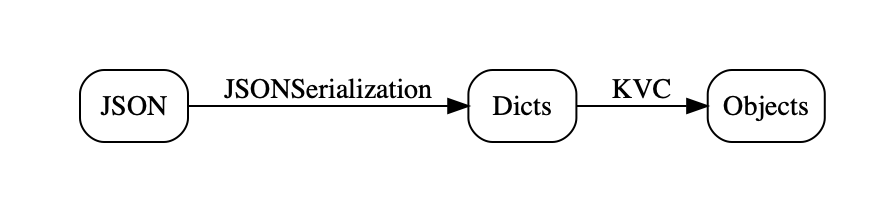
In the first instalment of this series, we saw that we could fairly trivially create objects from the plist created by NSJSONSerialization.

MPWObjectBuilder (.h .m) is a subclass of MPWPlistBuilder that changes just a few things: instead of creating dictionaries, it creates objects, and instead of using -setObject:forKey: to set values in that dictionary, it uses the KVC message -setValue:forKey: (vive la petite différence!) to set values in that object.


@implementation MPWObjectBuilder

-(instancetype)initWithClass:(Class)theClass
{
    self=[super init];
    self.cache=[MPWObjectCache cacheWithCapacity:20 class:theClass];
    return self;
}

-(void)beginDictionary
{
    [self pushContainer:GETOBJECT(_cache) ];
}

-(void)writeObject:anObject forKey:aKey
{
    [*tos setValue:anObject forKey:aKey];
}

That's it! Well, all that need concern us for now, the actual class has some additional features that don't matter here. The _tos instance variable is the top of a stack that MPWPlistBuilder maintains while constructing the result. The MPWObjectCache is just a factory for creating objects.

So let's fire it up and see what it can do!


-(void)decodeMPWDirect:(NSData*)json
{
    NSArray *keys=@[ @"hi", @"there", @"comment"];
    MPWMASONParser *parser=[MPWMASONParser parser];
    MPWObjectBuilder *builder=[[MPWObjectBuilder alloc] initWithClass:[TestClass class]];
    [parser setBuilder:builder];
    [parser setFrequentStrings:keys];
    NSArray* objResult = [parser parsedData:json];
    NSLog(@"MPWMASON %@ with %ld elements",[objResult firstObject],[objResult count]);
}

Not the most elegant code in the universe, and not a complete parser by an stretch of the imagination, but workable.

Result: 621 ms.

Not too shabby, only 50% slower than baseNSJSONSerialization on our non-representative 44MB JSON file, but creating the final objects, instead of just the intermediate representation, and arround 7x faster than Apple's JSONDecoder.

Although still below 100 MB/s and nowhere near 2.5 GB/s we're also starting to close in on the performance level that should be achievable given the context, with 140ms for basic object creation and 124ms for a mostly empty parse.

Analysis and next steps

Ignoring such trivialities as actually being useful for more than the most constrained situations (array of single kind of object), how can we improve this? Well, make it faster, of course, so let's have a look at the profile:

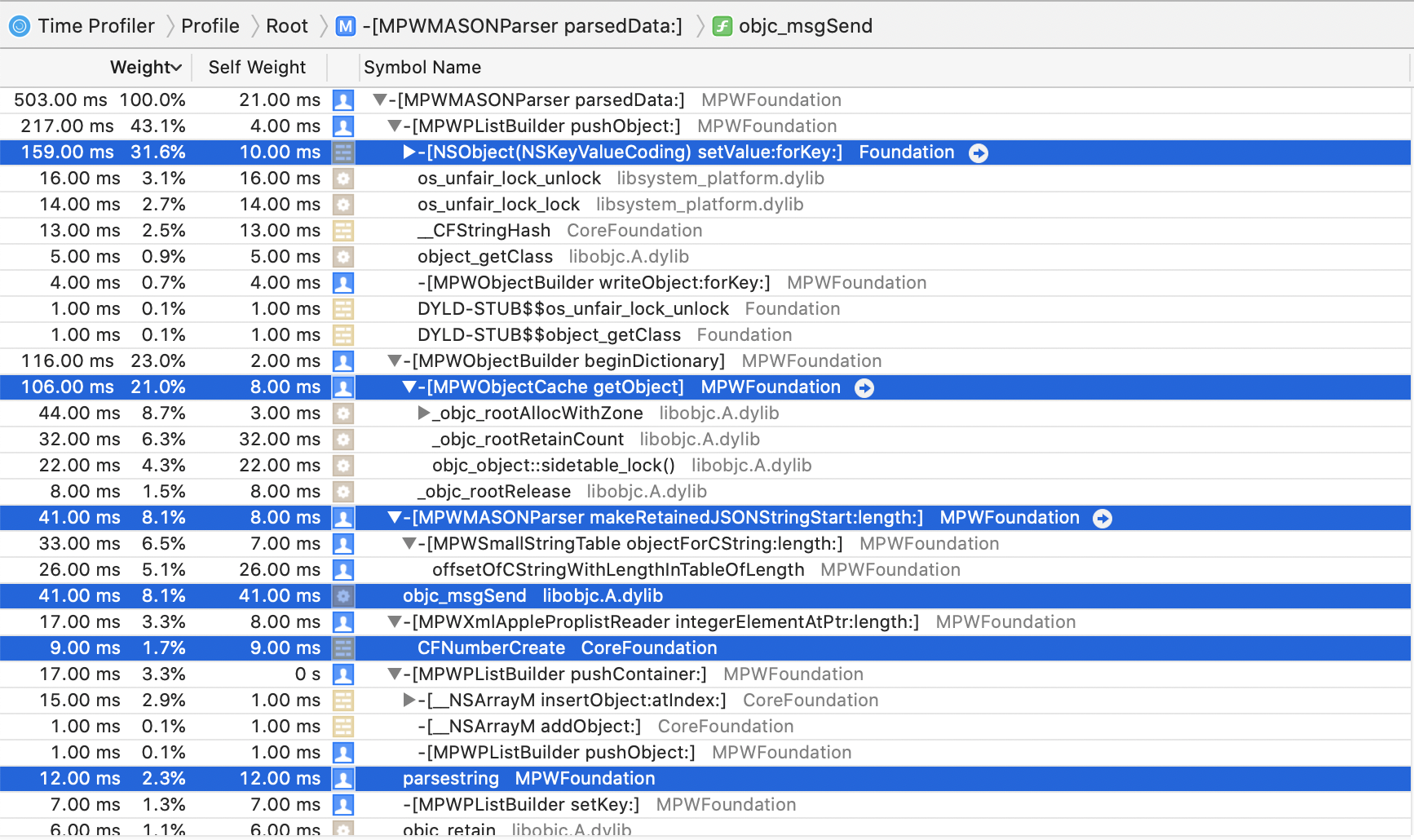
As expected, the KVC code is now the top contributor, with around 40% of total runtime. (The locking functions that show up as siblings of -setValue:forKey: are almost certainly part of that implementation, this slight misattribution of times is something you should generally expect and be aware of with Instruments. I am guessing it has to do with missing frame-pointers (-fomit-frame-pointer) but don't really feel any deep urge to investigate, as it doesn't materially impact the outcome of the analysis.

I guess that's another point: gather enough data to inform your next step, certainly no less, but also no more. I see both mistakes, the more common one definitely being making things "fast" without enough data. Or any, for that matter. If I had a €uro for every project that claims high performance without any (comparative) benchmarking, simply because they did something the authors think should be fast, well, you know, ....

The other extreme is both less common and typically less bad, as at least you don't get the complete nonsense of performance claims not backed by any performance testing, but running a huge battery of benchmarks on every step of an optimization process is probably going to get in the way of achieving results, and yes, I've seen this in practice.

So next we need to remove KVC.

TOC

Somewhat Less Lethargic JSON Support for iOS/macOS, Part 1: The Status Quo
Somewhat Less Lethargic JSON Support for iOS/macOS, Part 2: Analysis
Somewhat Less Lethargic JSON Support for iOS/macOS, Part 3: Dematerialization
Equally Lethargic JSON Support for iOS/macOS, Part 4: Our Keys are Small but Legion
Less Lethargic JSON Support for iOS/macOS, Part 5: Cutting out the Middleman
Somewhat Faster JSON Support for iOS/macOS, Part 6: Cutting KVC out of the Loop
Faster JSON Support for iOS/macOS, Part 7: Polishing the Parser
Faster JSON Support for iOS/macOS, Part 8: Dematerialize All the Things!
Beyond Faster JSON Support for iOS/macOS, Part 9: CSV and SQLite

Thursday, April 16, 2020

Equally Lethargic JSON Support for iOS/macOS, Part 4: Our Keys are Small but Legion

In our last instalment, we started implementing our JSON parser with lots of good ideas, such as dematerialization via a property list protocol, but immediately fell flat on our face with our code being 50% slower than NSJSONSerialization. And what's worse, there wasn't an obvious way out, as the bulk of the time was spent in Apple code.

Nobody said this was going to be easy.

Analysis

Let's have another look at the profile:

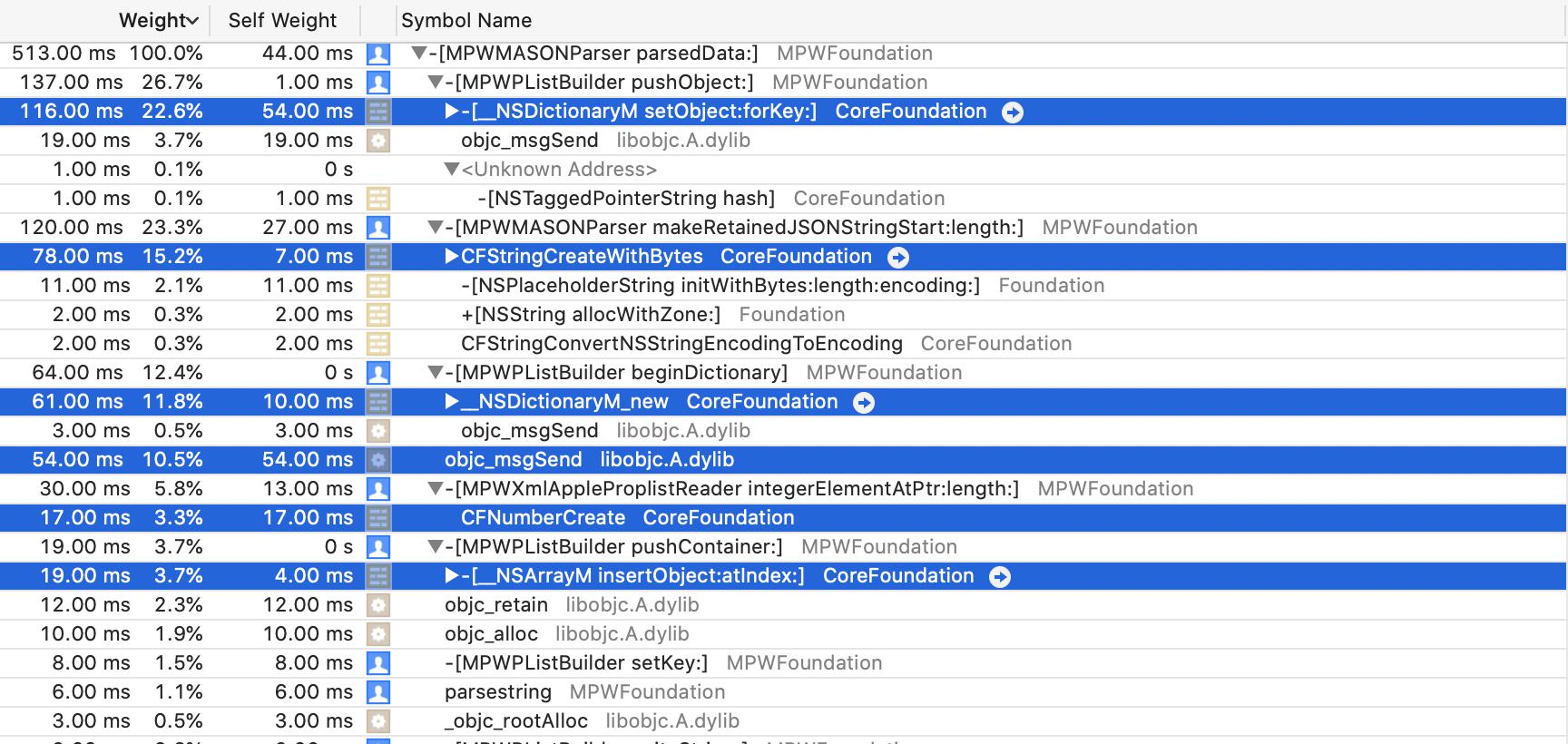
The top 4 consumers of CPU are -setObject:forKey:, string creation, dictionary creation and message sending. I don't really know what to do about either creating those dictionaries we have to create or setting their contents, so what about string creation?

Although making string creation itself faster is unlikely, what we can do is reduce the number of strings we create: since most of our JSON payload consists of objects né dictionaries, the vast majority of our strings is actually going to be string keys. So they will come from a small set of known strings and be on the small-ish side. Particularly the former suggests that we should re-use keys, rather than creating multiple new copies.

The usual way to look up something with a known key is an NSDictionary, but alas that would require the keys we look up to already be objects, meaning we would have to create string objects to look up our sting object values, rather defeating the purpose of the exercise.

What we would need is a way of looking up objects by raw C-Sting, an unadorned char*. Fortunately, I've been here before, so the required class has been in MPWFoundation for a little over 13 years. (What's the "Trump smug face emoticon?)

MPWSmallSStringTable

The MPWSmallStringTable (.h / .m ) class is exactly what it says on the tin: a table for looking up objects by (small) string keys. And it is accessible by char* (+length, don't want to require NUL termination) in addition to string objects.

Quite a bit of work went into making this fast, both the implementation and the interface. It is not a hash table, it compares chars directly, using indexing and bucketing to expend as little work as possible while discarding non-matching strings.

In fact, since performance is its primary reason for existing, its unit tests include performance comparisons against an NSDictionary with NSString keys, which currently clock in at 5-8x faster.

The interface includes two macros: OBJECTFORSTRINGLENGTH() and OBJECTFORCONSTANTSTRING(). You need to give the former a length, the latter figures the size out compile time using the sizeof operator, which really does return the length of string constants. Don't use it with non-constant strings (so char*) as there sizeof will return the size of the pointer.

Avoiding Allocation of Frequent Strings

With MPWSmallStringTable at hand, we can now use it in MPWMASONParser to look up common strings like our keys without allocating them.

The -setFrequentStrings: method we saw declared in the interface takes an array of strings, which the parser turns into a string table mapping from the C-Sting versions of those to the NSString version.


-(void)setFrequentStrings:(NSArray*)strings
{
	[self setCommonStrings:[[[MPWSmallStringTable alloc] initWithKeys:strings values:strings] autorelease]];
}

The method that is supposed to create string objects from char*s starts as follows:
-(NSString*)makeRetainedJSONStringStart:(const char*)start length:(long)len
{
	NSString *curstr;
	if ( commonStrings  ) {
		NSString *res=OBJECTFORSTRINGLENGTH( commonStrings, start, len );
		if ( res ) {
			return [res retain];
		}
	}
    ...

So we first check the common stings table, and only if we don't find it there do we drop down to the code to allocated the string. (Yeah, the -retain is probably questionable, though currently necessary)

Trying it out

Now all we need to do is tell the parser about those common strings before we ask it to parse JSON.
-(void)decodeMPWDicts:(NSData*)json
{
    NSArray *keys=@[ @"hi", @"there", @"comment"];
    MPWMASONParser *parser=[MPWMASONParser parser];
    [parser setFrequentStrings:keys];
    NSArray* plistResult = [parser parsedData:json];
    NSLog(@"MPWMASON %@ with %ld dicts",[plistResult firstObject],[plistResult count]);
}

While this seems a bit tacky, telling a JSON parser what to expect beforehand at least a little seems par for the course, so whatever.

How does that fare? Well, 440ms, which is 180ms faster than before and anywhere from as fast as NSJSONSerialization to 5% slower. Good enough for now.

This result is actually a bit surprising, because the keys that are created by both NSJSONSerialization and MPWMASONParser happen to be instances of NSTaggedPointerString. These strings do not get allocated on the heap, the entire string contents are cleverly encoded in the object pointer itself. Creating these should only be a couple of shifts and ORs, but apparently that takes (significantly) longer than doing the lookup, or more likely CF adds other overhead. This was certainly the case with the original tagged CFNumber, where just doing the shift+OR yourself was massively faster than calling CFNumberCreate().

What next?

Having MPWSmallStringTable immediately suggests ways of tackling the other expensive parts we identified in the profile, -setObject:forKey: and dictionary creation: use a string table with pre-computed key space, then set the objects via char* keys.

Another alternative is to use the MPWXmlAttributes class from MAX, which is optimized for the parsing and use-once case.

However, all this loses sight of the fact that we aren't actually interested in producing a plist. We want to create objects, ideally without creating that plist. This is a common pitfall I see in optimization work: getting so caught up in the details (because there is a lot of detail, and it tends to be important) that one loses sight of the context, the big picture so to speak.

Can this, creating objects from JSON, now be done more quickly? That will be in the next instalment. But as a taste of what's possible, we can just set the builder to nil, in order to see how the parser does when not having to create a plist.

The result: 160ms.

So yes, this can probably work, but it is work.

TOC

Somewhat Less Lethargic JSON Support for iOS/macOS, Part 1: The Status Quo
Somewhat Less Lethargic JSON Support for iOS/macOS, Part 2: Analysis
Somewhat Less Lethargic JSON Support for iOS/macOS, Part 3: Dematerialization
Equally Lethargic JSON Support for iOS/macOS, Part 4: Our Keys are Small but Legion
Less Lethargic JSON Support for iOS/macOS, Part 5: Cutting out the Middleman
Somewhat Faster JSON Support for iOS/macOS, Part 6: Cutting KVC out of the Loop
Faster JSON Support for iOS/macOS, Part 7: Polishing the Parser
Faster JSON Support for iOS/macOS, Part 8: Dematerialize All the Things!
Beyond Faster JSON Support for iOS/macOS, Part 9: CSV and SQLite

Friday, April 10, 2020

Somewhat Less Lethargic JSON Support for iOS/macOS, Part 1: The Status Quo

I just finished watching Daniel Lemire's talk on the current iteration of simdjson, a JSON parser that clocks in at 2.5GB/s! I've been following Daniel's work for some time now and can't really recommend it highly enough.

This reminded me of a recent twitter conversation where I had offered to contribute a fast, Swift-compatible JSON parser loosely based on MAX, my fast and convenient XML parser. Due to various factors most of which are not under my control, I can't really offer anything that's fast when compared to simdjson, but I can manage something quite a bit less lethargic than what's currently on offer in the Apple and particularly the Swift world.

Environmental assumptions and constraints

My first assumption is that we are going to operate in the Apple ecosystem, and for simplicity's sake I am going to use macOS. Next, I will assume that what we want from our parse(r) are domain objects for further processing within our application (or structs, the difference is not important in this context).

We are going to use the following class with a mix of integer and string instance variables, in Swift:


@objc class TestClass: NSObject, Codable {
    let hi:Int
    let there:Int
    let comment:String
...
}

and the same in Objective-C:


@interface TestClass : NSObject

@property (nonatomic) long hi,there;
@property (nonatomic,strong) NSString *comment;

@end

To make it all easy to measure, we are going to use one million objects, which we are going to initialise with increasing integers and the constant string "comment". This yields the same 44MB JSON file with different serialisation methods, which can be correctly parsed by all the parsers tested. This is obviously a very simple class an file structure, but I think it gives a reasonable approximation for real-world use.

The first thing to check is how quickly we can create these objects straight in code, without any parsing.

That should give us a good upper bound for the performance we can achieve when parsing to domain objects.


#define COUNT 1000000
-(void)createObjects
{
    NSMutableArray *objResult=[NSMutableArray arrayWithCapacity:COUNT+20];
    for ( int i=0;i<COUNT;i++ ) {
        TestClass *cur=[TestClass new];
        cur.hi=i;
        cur.there=i;
        cur.comment=@"comment";
        [objResult addObject:cur];
    }
    NSLog(@"Created objects in code w/o parsing %@ with %ld objects",objResult[0],[objResult count]);
}

On my Quad Core, 2.7Ghz MBP '18, this runs in 0.141 seconds. Although we aren't actually parsing, it would mean that just creating all the objects that would result from parsingg our 44MB JSON file would yield a rate of 312 MB/s.

Wait a second! 312MB/s is almost 10x slower than Daniel Lemire's parser, the one that actually parses JSON, and we are only creating the objects that would result if we were parsing, without doing any actual parsing.

This is one of the many unintuitive aspects of parsing performance: the actual low-level, character-level parsing is generally the least important part for overall performance. Unless you do something crazy like use NSScanner. Don't use NSScanner. Please.

One reason this is unintuitive is that we all learned that performance is dominated by the innermost loop, and character level processing is the innermost loop. But when you have magnitudes in performance differences and inner and outer loops differ by less than that amount, the stuff happennnig in the outer loop can dominate.

NSJSONSerialization

Apple's JSON story very much revolves around NSJSONSerialization, very much like most of the rest of its serialization story revolves around the very similar NSPropertyListSerialization class. It has a reasonable quick implementation, turning the 44 MB JSON file into an NSArrray of NSDictionary instances in 0.421 seconds when called from Objective-C, for a rate of 105 MB/s. From Swift, it takes 0.562 seconds, for 78 MB/s.

Of course, that gets us to a property list (array of dicts, in this case), not to the domain objects we actually want.

If you read my book (did I mention my book? Oh, I think I did), you will know that this type of dictonary representation is fairly expensive: expensive to create, expensive in terms of memory consumption and expensive to access. Just creating dictionaries equivalent to the objects we created before takes 0.321 seconds, so around 2.5x the time for creating the equivalent objects and a "rate" of 137 MB/s relative to our 44 MB JSON file.


-(void)createDicts
{
    NSMutableArray *objResult=[NSMutableArray arrayWithCapacity:COUNT+20];
    for ( int i=0;i<COUNT;i++ ) {
        NSMutableDictionary *cur=[NSMutableDictionary dictionary];
        cur[@"hi"]=@(i);
        cur[@"there"]=@(i);
        cur[@"comment"]=@"comment";
        [objResult addObject:cur];
    }
    NSLog(@"Created dicts in code w/o parsing %@ with %ld objects",objResult[0],[objResult count]);
}

Creating the dict in a single step using a dictionary literal is not significantly faster, but creating an immutable copy of the mutable dict after we're done filling brings the time to half a second.

Getting from dicts to objects is typically straightforward, if tedious: just fetch the entry of the dictionary and call the corresponding setter with the value thus retrieved from the dictionary. As this isn't production code and we're just trying to get some bounds of what is possible, there is an easier way: just use Key Value Coding with the keys found in the dictionary. The combined code, parsing and then creating the objects is shown below:


-(void)decodeNSJSONAndKVC:(NSData*)json
{
    NSArray *keys=@[ @"hi", @"there", @"comment"];
    NSArray *plistResult=[NSJSONSerialization JSONObjectWithData:json options:0 error:nil];
    NSMutableArray *objResult=[NSMutableArray arrayWithCapacity:plistResult.count+20];
    for ( NSDictionary *d in plistResult) {
        TestClass *cur=[TestClass new];
        for (NSString *key in keys) {
            [cur setValue:d[key] forKey:key];
        }
        [objResult addObject:cur];
    }
    NSLog(@"NSJSON+KVC %@ with %ld objects",objResult[0],[objResult count]);
}

Note that KVC is slow. Really slow. Order-of-magnitude slower than just sending messages kind of slow, and so it has significant impact on the total time, which comes to a total of 1.142 seconds including parsing and object creation, or just shy of 38 MB/s.

Swift JSON Coding

For the first couple of releases of Swift, JSON support by Apple was limited to a wrapped NSJSONSerialization, with the slight performance penalty already noted. As I write in my book (see sidebar), many JSON "parsers" were published, but none of these with the notable exception of the Big Nerd Ranch's Freddy were actual parses, they all just transformed the arrays and dictionaries returned by NSJSONSerialization into Swift objects. Performance was abysmal, with around 25x overhead in addition to the basic NSJSONSerialization parse.

Apple's Swift Codable promised to solve all that, and on the convenience front it certainly does a great job.


    func readJSONCoder(data:Data) -> [TestClass] {
        NSLog("Swift Decoding")
        let coder=JSONDecoder( )
        let array=try! coder.decode([TestClass].self, from: data)
        return array
    }

(All the forcing is because this is just test code, please don't do this in production!). Alas, performance is still not great: 4.39 seconds, or 10 MB/s. That's 10x slower than the basic NSJSONSerialization parse and 4x slower than our slow but simple complete parse via NSJSONSerialization and KVC.

However, it is significantly faster than the previous third-party JSON to Swift objects "parsers", to the tune of 3-4x. This is the old "first mark up 400% then discount 50%" sales trick applied to performance, except that the relative numbers are larger.

Third Party JSON Parsers

I looked a little at third party JSON parsers, particularly JASON, STJSON and ZippyJSON.

STTJSON does not make any claims to speed and manages to clock in at 5 seconds, or just under 10 MB/s. JASON bills itself as a "faster" JSON parser (they compare to SwiftyJSON), and does reasonably well at 0.75 seconds or 59 MB/s. However both of these parse to their own internal representation, not to domain objects (or structs), and so should be compared to NSJSONSerialization, at which point they both disappoint.

Probably the most interesting of these is ZippyJSON, as it uses Daniel Lemire's simdjson and is Codable compatible. Alas, I couldn't get ZippyJSON to compile, so I don't have numbers, but I will keep trying. They claim around 3x faster than Apple's JSONDecoder, which would make it the only parser to be at least in the same ballpark as the trivial NSJSONSerialization + KVC method I showed above.

Another interesting tidbit comes from ZippyJSON's README, under the heading "Why is it so much faster".

Apple's version first converts the JSON into an NSDictionary using NSJSONSerialization and then afterwards makes things Swifty. The creation of that intermediate dictionary is expensive.
This is true by itself: first converting to an intermediate representation is slow, particularly one that's as heavy-weight as property lists. However, it cannot be the primary reason, because creating that expensive representation only takes 1/8th of the total running time. The other 7/8ths is Codable apparently talking to itself. And speaking very s-l-o-w-l-y while doing that.

To corroborate, I also tried a the Flight-School implementation of Codable for MessagePack, which obviously does not use NSJSONSerialization. It makes no performance claims and takes 18 seconds to decode the same objects we used in the JSON files, of course with a different file that's 34 MB in size. Normalized to our 44 MB file that would be 2.4 MB/s.

MAX and MASON

So where does that leave us? Considering what simdjs shows is theoretically possible with JSON parsing, we are not in a good place, to put it mildly. 2.5 GB/s vs. 10 MB/s with Apple's JSONDecoder, several times slower than NSJSONSerialization, which isn't exactly a speed daemon and around 30x slower than pure object creation. Comically bad might be another way of putting it. At least we're being entertained.

What can I contribute? Well, I've been through most of this once before with XML and the result was/is MAX (Messaging API for XML), a parser that is not just super-fast itself (though no SIMD), but also presents APIs that make it both super-convenient and also super-fast to go directly from the XML to an object-representation, either as a tree or a stream of domain objects while using mostly constant memory. Have I mentioned my book? Yeah, it's in the book, in gory detail.

Anyway, XML has sorta faded, so the question was whether the same techniques would work for a JSON parser. The answer is yes, roughly, though with some added complexity and less convenience because JSON is a less informative file format than XML. Open- and close-tags really give you a good heads-up as to what's coming that "{" just does not.

The goal will be to produce domain objects at as close to the theoretical maximum of slightly more than 300 MB/s as possible, while at the same time making the parser convenient to use, close to Swift Codable in convenience. It won't support Codable per default, as the overheads seem to be too high, but ZippyJSON suggests that an adapter wouldn't be too hard.

That parser is MPWMASONParser, and no, it isn't done yet. In its initial state, it parses JSON to dictionaries in 0.58 seconds, or 76 MB/s and slightly slower than NSJSONSerialization.

So we have a bit of way to go, come join me on this little parsing performance journey!

TOC

Somewhat Less Lethargic JSON Support for iOS/macOS, Part 1: The Status Quo
Somewhat Less Lethargic JSON Support for iOS/macOS, Part 2: Analysis
Somewhat Less Lethargic JSON Support for iOS/macOS, Part 3: Dematerialization
Equally Lethargic JSON Support for iOS/macOS, Part 4: Our Keys are Small but Legion
Less Lethargic JSON Support for iOS/macOS, Part 5: Cutting out the Middleman
Somewhat Faster JSON Support for iOS/macOS, Part 6: Cutting KVC out of the Loop
Faster JSON Support for iOS/macOS, Part 7: Polishing the Parser
Faster JSON Support for iOS/macOS, Part 8: Dematerialize All the Things!
Beyond Faster JSON Support for iOS/macOS, Part 9: CSV and SQLite

Sunday, May 9, 2010

iPhone XML: from DOM to incremental SAX

In my last post, I extended Ray Wenderlich's XML parser comparison to MAX, and performance seemed to be about 2x better than the nearest competitor, TBXML and around 7x faster than NSXMLParser, Cocoa Touch's built-in XML parser.

While the resulting code has been posted here, I haven't yet explained how I got there.  First, I downloaded both Ray's project and Objective-XML 5.3.   iPhone OS requires a bit of trickiness to get a reusable library, partly due to the fact that frameworks or dynamic libraries are not supported, partly due to the fact that simulator and device are not just different Xcode architectures of a single SDK, and not even just different SDKs, but actually different platforms.  If anyone can tell me how to create a normal target that can compile/links for both the simulator and the device, I'd love to hear about it!

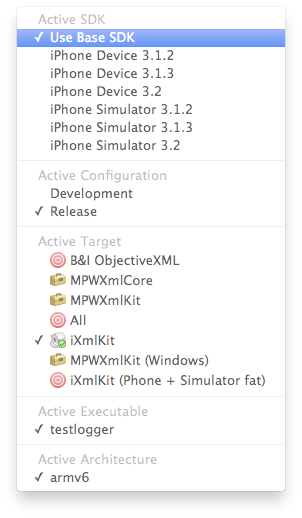
So, in order to compile for iPhoneOS, you'll need to select the iXmlKit target:

selector.png

You'll need to build twice, changing Active SDK settings once to the the device and once to the simulator.  You will then have two copies of the libiXmlKit.a library, one in the directory Release-iphoneos, the other in Release-iphonsimulator (both relative to your base build directory):


marcel@mpwls[LD]ls -la ~/programming/Build/Release-iphoneos/ 
-rw-r--r--   1 marcel  staff   521640 May  9 19:52 libiXmlKit.a


These two copies then need to be joined together using the  lipo command to create a single library that can be used both with the simulator and the device.

lipo -create Release-iphoneos/libiXmlKit.a Release-iphonesimulator/libiXmlKit.a -output  Release/libiXmlKit.a

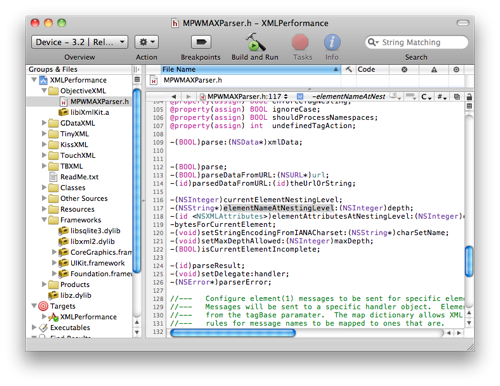
(Newer Objective-XML versions will have a shell-script target that automates this process).  Once I had the fat libiXmlKit.a library, I created a new MAX group in the XMLPerformance project, and copied both the library and the MAX header file into that group:

MAX-in-XMLPerf.png


I then created a new MAX Song parser class:

#import "iTunesRSSParser.h"


@interface MAXSongParser : iTunesRSSParser {

  id parser;

  NSDateFormatter *parseFormatter;

}

@end

The implementation is also fairly straightforward, with your basic init method:


#import "MAXSongParser.h"

#import "MPWMAXParser.h"

#import "Song.h"


@implementation MAXSongParser


-init

{

 self=[super init];

    parseFormatter = [[NSDateFormatter alloc] init];

    [parseFormatter setDateStyle:NSDateFormatterLongStyle];

    [parseFormatter setTimeStyle:NSDateFormatterNoStyle];

    MPWMAXParser *newParser=[MPWMAXParser parser];

    [newParser setUndefinedTagAction:MAX_ACTION_NONE];

    [newParser setHandler:self forElements:[NSArray arrayWithObjects:                 @"item",@"album",@"title",@"channel",@"rss",@"category",nil]

               inNamespace:nil prefix:@"" map:nil];

    [newParser setHandler:self forElements:[NSArray arrayWithObjects:

                 @"releasedate",@"artist",@"album",nil]

             inNamespace:@"http://phobos.apple.com/rss/1.0/modules/itms/" 

             prefix:@"" map:nil];

    parser=[newParser retain];

   return self;

}

The MAX parser is initialized in this init method.  We define the elements we care about using the two "setHandler:forElements:inNamespace:prefix:map:" messages, one for each namespace we will be dealing with.  In the default (RSS) namespace, we are interested in the "item", "album", "title", "channel", "rss" and "category" elements.  In Apple's special "itms" namespace, we will handle "releasdate", "artist" and "album".  Setting MAX_ACTION_NONE as the undefined tag action means that the parser will ignore elements not listed as interesting and all their sub-elements.

Songs are created in the -itemElement:... method, which turns the relevant child-elements of the item element into Song attributes:

-itemElement:children attributes:attributes parser:parser

{
   Song *song=[[Songalloc] init];
   [song setAlbum:[children objectForUniqueKey:@"album"]];
   [song setTitle:[children objectForUniqueKey:@"title"]];
   [song setArtist:[children objectForUniqueKey:@"artist"]];
   [song setAlbum:[children objectForUniqueKey:@"album"]];
   [song setCategory:[children objectForUniqueKey:@"category"]];
   [song setReleaseDate:[parseFormatter dateFromString:[children objectForUniqueKey:@"releasedate"]] ];
   return song;
}

Two more methods make the actual parse process complete:  <channel> elements have one or more <item> elements, so we want to return all of them, using "objectsForKey:":

-channelElement:children attributes:attributes parser:parser
{
  return [[children objectsForKey:@"item"] retain];
}

Finally, there are a bunch of elements that we have defined interest in but treat identically...these can be handled using the "default" element handler:


-defaultElement:children attributes:attributes parser:parser
{
  return [[children lastObject] retain];
}


That concludes the routines that actually parse the XML into objects, now for kicking off the parser. With the timing code removed, the method is fairly straightforward:


- (void)downloadAndParse:(NSURL *)url {
   id pool=[NSAutoreleasePool new];
   [parserparse: [NSData dataWithContentsOfURL:url]];
   for ( id song in [parserparseResult] ) {
       [self performSelectorOnMainThread:@selector(parsedSong:)
             withObject:song waitUntilDone:NO];
   }
   [pool release];
}
With the timing code, it all gets a bit messier:


- (void)downloadAndParse:(NSURL *)url {
   id pool=[NSAutoreleasePool new];
   [self performSelectorOnMainThread:@selector(downloadStarted) withObject:nil waitUntilDone:NO];
   NSData *data=[NSData dataWithContentsOfURL:url];
   [self performSelectorOnMainThread:@selector(downloadEnded) withObject:nil waitUntilDone:NO];
   NSTimeInterval start = [NSDate timeIntervalSinceReferenceDate];
   [parserparse:data];
   for ( id song in [parserparseResult] ) {
      [selfperformSelectorOnMainThread:@selector(parsedSong:) withObject:song waitUntilDone:NO];
   }
   NSTimeInterval duration = [NSDatetimeIntervalSinceReferenceDate] - start;
   [selfperformSelectorOnMainThread:@selector(addToParseDuration:) withObject:[NSNumbernumberWithDouble:duration] waitUntilDone:NO];
   [selfperformSelectorOnMainThread:@selector(parseEnded) withObject:nilwaitUntilDone:NO];

[[NSURLCachesharedURLCache] removeAllCachedResponses];

 [pool release];

}


This produces a non-incremental DOM-style parser, so we first download the data, then process it into a DOM and finally transfer the processed objects to the main thread for display.  It differs from other DOM-syle XML parsers in that it actually produces domain objects (as a Domain Object Model parser arguably should), rather than a generic XML DOM that must then be converted to objects.

Turning the DOM-style parser into a SAX-stye parser is almost completely trivial.  Instead of returning the Song objects at the end of itemElement:..


   [song setReleaseDate:[parseFormatterdateFromString:[children objectForUniqueKey:@"releasedate"]] ];
  return song;
}


we instead pass them to the delegate there and return nil so no tree is constructed:

   [song setReleaseDate:[parseFormatterdateFromString:[children objectForUniqueKey:@"releasedate"]] ];

[self performSelectorOnMainThread:@selector(parsedSong:)

withObject:song waitUntilDone:NO];

[song release];

return nil;

}


This means we can also remove the "channelElement" method and the for loop in downloadAndParse: that passed the Song objects to the main thread.  This is a SAX-style parser (though it doesn't use the SAX methods and does produce domain objects), but it is still non-incremental because it first downloads all the data and then parses it.  If we want to turn the SAX parser into an incremental parser that overlaps processing with downloading, there is one final tweak that fortunately further simplifies the downloadAndParse method (again with timing code removed):


- (void)downloadAndParse:(NSURL *)url {
   id pool=[NSAutoreleasePoolnew];
  [parserparseDataFromURL:url];
   [[NSURLCachesharedURLCache] removeAllCachedResponses];
   [pool release];
}

While this is probably best not only in terms of performance and responsiveness, but also in terms of code size, it doesn't play well with the XMLPerformance example, because there are no external measurement hooks that allow us to separate downloading from parsing for performance measurement purposes.

In addition, the XMLPerformance example is odd in that is both multi-threaded and measure real time rather than CPU time when measuring parse performance.  The reason this is odd is that when both parsing and display are active, the scheduler can take the CPU away from the XML parsing thread at any time and switch to the display thread, but this time will be counted as XML parsing time by the measurement routines.  This is obviously incorrect and penalizes all the incremental parsers, which is why Ray's comparison showed all the DOM parsers as performing better than the SAX parsers.

I hope these explanations show how to create different styles of parsers using MAX.


Sunday, May 2, 2010

iPhone XML Performance Revisited

Ray Wenderlich has done a great comparison of iPhone XML parsers, using the same sample I had looked at earlier in the context of responsiveness.


As Ray was comparing performance, my hobby-horse, I was obviously curious as to how MAX stacked up against all the upstart competition. Quite well, as it turns out (average of 5 runs on an iPad with 3.2):


Figure 1: total times (seconds)


MAX was about 50% faster than the closest competition, TBXML, at 0.43s vs. 0.61s.


However, the XMLPerformance sample is a bit weird in that it measures elapsed time, not CPU time, and is multi-threaded, updating the display as results come in.


In order to account for this overhead that has nothing to do with the XML parsers, I added a "Dummy" parser that doesn't actually parse anything, but rather just generates dummy Song entries as quickly as possible. This takes around 0.2 seconds all by itself. Subtracting this non-XML overhead from the total times yields the following results:


Figure 2: XML parse times (seconds)


When measuring just the XML parsers themselves, MAX is around twice as fast as the closest competition and seven times as fast as the built in NSXMLParser.


Sweet.

[Update]  I forgot the link to where I had uploaded the source: XMLPerformance.tgz at http://www.metaobject.com/downloads/Objective-C/

Monday, January 25, 2010

Objective-XML 5.3

New in this release:
  • Cocotron targets for Windows support.
  • XMLRPC support.
  • No longer uses 'private' API that was causing AppStore rejections for some iPhone apps using Objective-XML.
  • Support for numeric entitites.
http://www.metaobject.com/downloads/Objective-C/Objective-XML-5.3.tgz.

Wednesday, December 9, 2009

Simple Objective-XML example

Many times now, I've been asked about more Objective-XML examples. Here's a very simple one. It is adapted from Marcus Zarra's very helpful libxml and xmlreader tutorial. That tutorial shows how to parse a very simple XML format using libxml2.

The XML file parsed is the following:

<?xml version="1.0" encoding="UTF-8"?>

<root>

  <person>

    <name>John Doe</name>

    <age>14</age>

  </person>

  <person>

    <name>Mary Doe</name>

    <age>14</age>

  </person>

  <person>

    <name>John Smith</name>

    <age>15</age>

  </person>

</root>

It is parsed using at application startup using the following code:

- (void)applicationDidFinishLaunching:(NSNotification*)notification

{

NSString *path = [[NSBundle mainBundle] pathForResource:@"xmlExample" ofType:@"xml"];

NSData *xmlData = [NSData dataWithContentsOfFile:path];

xmlTextReaderPtr reader = xmlReaderForMemory([xmlData bytes],

[xmlData length], 

[path UTF8String], nil, 

(XML_PARSE_NOBLANKS | XML_PARSE_NOCDATA | XML_PARSE_NOERROR | XML_PARSE_NOWARNING));

if (!reader) {

NSLog(@"Failed to load xmlreader");

return;

}

NSString *currentTagName = nil;

NSDictionary *currentPerson = nil;

NSString *currentTagValue = nil;

NSMutableArray *people = [NSMutableArray array];

char* temp;

while (true) {

if (!xmlTextReaderRead(reader)) break;

switch (xmlTextReaderNodeType(reader)) {

case XML_READER_TYPE_ELEMENT:

//We are starting an element

temp =  (char*)xmlTextReaderConstName(reader);

currentTagName = [NSString stringWithCString:temp

encoding:NSUTF8StringEncoding];

if ([currentTagName isEqualToString:@"person"]) {

currentPerson = [NSMutableDictionary dictionary];

[people addObject:currentPerson];

}

continue;

case XML_READER_TYPE_TEXT:

//The current tag has a text value, stick it into the current person

temp = (char*)xmlTextReaderConstValue(reader);

currentTagValue = [NSString stringWithCString:temp

encoding:NSUTF8StringEncoding];

if (!currentPerson) return;

[currentPerson setValue:currentTagValue forKey:currentTagName];

currentTagValue = nil;

currentTagName = nil;

default: continue;

}

}

NSLog(@"%@:%s Final data: %@", [self class], _cmd, people);

[self setRecords:people];

}

To parse it using MAX you need to add MPWXmlKit and MPWFoundation to your project, and then replace the code above with the following:

- (void)applicationDidFinishLaunching:(NSNotification*)notification

{

NSString *path = [[NSBundle mainBundle] pathForResource:@"xmlExample" ofType:@"xml"];

NSArray *people=[[MPWMAXParser parser] parsedDataFromURL:[NSURL fileURLWithPath:path]];

[self setRecords:people];

}

Sunday, November 8, 2009

Exploring the Weather Underground with Objective-XML and Objective-Smalltalk

Having taken up various forms of flying last year, I have developed a strong interest in the weather, particularly wind information. While there are various web-sites with relevant information, for example Jeff Greenbaum's excellent Wind Conditions Page for Pacifica page, they don't really present the information quite the way I need, and also don't really work well on small mobile devices...

Fixing that should hopefully just be ASMOP. The Weather Underground fortunately has some reasonably well-documented XML APIs, let's see what they have to offer and wether we can get to the data we want.

First, let's fire up the interactive Smalltalk Shell (stsh) and load the Objective-XML framework.

marcel@spock[Projects]stsh
> context loadFramework:'MPWXmlKit'
Next, let's have a look at the raw XML returned by the Weather Underground APIs.
> urlstr:='http://api.wunderground.com/weatherstation/WXCurrentObXML.asp?ID=KCADALYC1'
> url:=NSURL URLWithString: urlstr
> NSString stringWithContentsOfURL:url.
> 
Hmm...no result. (It turns out that Weather Underground checks the user agent and errors if it doesn't find one. The various convenience methods do not send a User Agent). Maybe curl can help?
>context addExternalCommand:'curl'.
>curl run:'http://api.wunderground.com/weatherstation/WXCurrentObXML.asp?ID=KCADALYC1'
<?xml version="1.0"?>
	<current_observation>
		<credit>Weather Underground Personal Weather Station</credit>
		<credit_URL>http://wunderground.com/weatherstation/</credit_URL>
		<image>
		<url>http://icons.wunderground.com/graphics/bh-wui_logo.gif</url>
		<title>Weather Underground</title>
		<link>http://wunderground.com/weatherstation/</link>
		</image>
		<location>
		<full>Mussel Rock, Daly City, CA</full>
		<neighborhood>Mussel Rock</neighborhood>
		<city>Daly City</city>
		<state>CA</state>
		<zip></zip>
		<latitude>37.667347</latitude>
		<longitude>-122.489342</longitude>
		<elevation>514 ft</elevation>
		</location>
		<station_id>KCADALYC1</station_id>
		<station_type>Fan-aspirated Davis Vantage Pro 2 Plus</station_type>
		<observation_time>Last Updated on November 7, 1:55 PM PST</observation_time>
		<observation_time_rfc822>Sat, 07 November 2009 21:55:21 GMT</observation_time_rfc822>
		<weather></weather>
		<temperature_string>56.9 F (13.8 C)</temperature_string>
		<temp_f>56.9</temp_f>
		<temp_c>13.8</temp_c>
		<relative_humidity>83</relative_humidity>
		<wind_string>From the NW at 15.0 MPH Gusting to 16.0 MPH</wind_string>
		<wind_dir>NW</wind_dir>
		<wind_degrees>313</wind_degrees>
		<wind_mph>15.0</wind_mph>
		<wind_gust_mph>16.0</wind_gust_mph>
		<pressure_string>30.07" (1018.2 mb)</pressure_string>
		<pressure_mb>1018.2</pressure_mb>
		<pressure_in>30.07</pressure_in>
		<dewpoint_string>51.8 F (11.0 C)</dewpoint_string>
		<dewpoint_f>51.8</dewpoint_f>
		<dewpoint_c>11.0</dewpoint_c>
		
		<heat_index_string></heat_index_string>
		<heat_index_f></heat_index_f>
		<heat_index_c></heat_index_c>
		
		<windchill_string></windchill_string>
		<windchill_f></windchill_f>
		<windchill_c></windchill_c>
		
		<solar_radiation>483.00</solar_radiation>
		<UV>2.5</UV>
		<precip_1hr_string>0.00 in (0.0 mm)</precip_1hr_string>
		<precip_1hr_in>0.00</precip_1hr_in>
		<precip_1hr_metric>0.0</precip_1hr_metric>
		<precip_today_string>0.01 in (0.0 mm)</precip_today_string>
		<precip_today_in>0.01</precip_today_in>
		<precip_today_metric>0.0</precip_today_metric>
		<history_url>http://www.wunderground.com/weatherstation/WXDailyHistory.asp?ID=KCADALYC1</history_url>
		<ob_url>http://www.wunderground.com/cgi-bin/findweather/getForecast?query=37.667347,-122.489342</ob_url>
	</current_observation>
<!-- 0.029:0 -->
Much better. Now let's see if we can parse that XML data into a Cocoa Property List.
> parser := MPWMAXParser parser.
> parser parsedDataFromURL: 'http://api.wunderground.com/weatherstation/WXCurrentObXML.asp?ID=KCADALYC1'
{
    UV = "2.5";
    credit = "Weather Underground Personal Weather Station";
    "credit_URL" = "http://wunderground.com/weatherstation/";
    "dewpoint_c" = "11.1";
    "dewpoint_f" = "51.9";
    "dewpoint_string" = "51.9 F (11.1 C)";
    "heat_index_c" =     {
    };
    "heat_index_f" =     {
    };
    "heat_index_string" =     {
    };
    "history_url" = "http://www.wunderground.com/weatherstation/WXDailyHistory.asp?ID=KCADALYC1";
    image =     {
        link = "http://wunderground.com/weatherstation/";
        title = "Weather Underground";
        url = "http://icons.wunderground.com/graphics/bh-wui_logo.gif";
    };
    location =     {
        city = "Daly City";
        elevation = "514 ft";
        full = "Mussel Rock, Daly City, CA";
        latitude = "37.667347";
        longitude = "-122.489342";
        neighborhood = "Mussel Rock";
        state = CA;
        zip =         {
        };
    };
    "ob_url" = "http://www.wunderground.com/cgi-bin/findweather/getForecast?query=37.667347,-122.489342";
    "observation_time" = "Last Updated on November 7, 1:55 PM PST";
    "observation_time_rfc822" = "Sat, 07 November 2009 21:55:51 GMT";
    "precip_1hr_in" = "0.00";
    "precip_1hr_metric" = "0.0";
    "precip_1hr_string" = "0.00 in (0.0 mm)";
    "precip_today_in" = "0.01";
    "precip_today_metric" = "0.0";
    "precip_today_string" = "0.01 in (0.0 mm)";
    "pressure_in" = "30.07";
    "pressure_mb" = "1018.2";
    "pressure_string" = "30.07\" (1018.2 mb)";
    "relative_humidity" = 83;
    "solar_radiation" = "482.00";
    "station_id" = KCADALYC1;
    "station_type" = "Fan-aspirated Davis Vantage Pro 2 Plus";
    "temp_c" = "13.9";
    "temp_f" = "57.0";
    "temperature_string" = "57.0 F (13.9 C)";
    weather =     {
    };
    "wind_degrees" = 342;
    "wind_dir" = NNW;
    "wind_gust_mph" = "24.0";
    "wind_mph" = "18.0";
    "wind_string" = "From the NNW at 18.0 MPH Gusting to 24.0 MPH";
    "windchill_c" =     {
    };
    "windchill_f" =     {
    };
    "windchill_string" =     {
    };
}
That looks good, we can see the wind information near the bottom of the output, with keys "wind_degrees" and "wind_mph". So let's grab the values for those keys using the collect Higher Order Message and -objectForKey:.
> (parser parsedDataFromURL:'http://api.wunderground.com/weatherstation/WXCurrentObXML.asp?ID=KCADALYC1' ) collect objectForKey: #( wind_mph wind_dir wind_string ) each. 
21.0
NW
From the NW at 21.0 MPH Gusting to 24.0 MPH
Almost what we wanted, except that we grabbed the wind direction as a string instead of the exact numeric direction. Easy fix:
> (parser parsedDataFromURL: 'http://api.wunderground.com/weatherstation/WXCurrentObXML.asp?ID=KCADALYC1' ) collect objectForKey: #( wind_mph wind_degrees wind_string ) each.
12.0
318
From the NW at 12.0 MPH Gusting to 24.0 MPH
>
Perfect. We have the wind speed, the direction and an informative text in case we want to display that.

Sunday, February 8, 2009

Objective-XML-5.0.1

Just pushed out a minor bugfix release to Objective-XML-5.0:
  • Re-enabled character-set conversion code that had gotten disabled
  • Fixed a compile-error for some targets
  • Other minor improvements
Download here: http://www.metaobject.com/downloads/Objective-C/Objective-XML-5.0.1.tgz

Sunday, January 25, 2009

Objective-XML 5.0

I've just pushed out a new release of Objective-XML, with some pretty significant new features.

Incremental parsing

This feature, which was already discussed a little in an earlier post, is now available in an official release. In short, Objective-XML will now stream data from network data sources (specified by URL) and produce results incrementally, rather than reading all of the data first and then parsing it. This can make a huge difference in responsiveness and perceived performance for slow networks. CPU and memory consumption will be slightly higher because of extra buffering and buffer stitching required, so this should only be used when necessary.

Static iPhone library

Although Objective-XML has always been compatible with the iPhone, previous releases required copying the pre-requisite files into your project. This burden has now been eased by the inclusion of a static library target. You still need to copy the headers, either MPWMAXParser.h or MPWXmlParser.h (or both).

Unique keys

Previous releases of Objective-XML had an -objectForTag:(int)tag method for quickly retrieving attribute or element values.


enum songtags {
  item_tag=10, title_tag, category_tag	
};
...
  [parser setHandler:self forElements:[NSArray arrayWithObjects:@"item",@"title",@"category",nil]
          inNamespace:nil prefix:@"" map:nil tagBase:item_tag];
...
-itemElement:(MPWXMLAttributes*)children attributes:(MPWXMLAttributes*)attributes parser:(MPWMAXParser*)p
{
   ...
   [song setTitle:[children objectForTag:title_tag]];
   ...

Objective-XML adds an -objectForUniqueKey:aKey method that removes the need for these additional integer tags.
...
  [parser setHandler:self forElements:[NSArray arrayWithObjects:@"item",@"title",@"category",nil]
          inNamespace:nil prefix:@"" map:nil];
...
-itemElement:(MPWXMLAttributes*)children attributes:(MPWXMLAttributes*)attributes parser:(MPWMAXParser*)p
{
   ...
   [song setTitle:[children objectForUniqueKey:@"title"]];
   ...


In addition to providing faster access, the integer tags also served to disambiguate tag names that might occur in multiple namespaces. To handle these conflicts, there now is a -objectForUniqueKey:aKey namespace:aNamespace method. The namespace objects required for this disambiguation process are now returned by the -setHandler:... and -declareAttributes:... methods, which were previously void.

Default methods

One of the attractive features of DOM parsers is that they do something useful "out of the box": point a DOM parser at some XML and you get back a generic in-memory representation of that XML that you can then start taking apart. However, once you go down that road, you are stuck with the substantial CPU and memory overheads of that generic representation.

Streaming parser like SAX or MAX can be a lot more efficient, but it takes a lot more time and effort until achieving a first useful result. Default methods overcome this hurdle by also delivering an immediately useful generic representation without any extra work. Unlike a DOM, however, this generic representation can be incrementally replaced by more specialized and efficient processing later on.